unixgreybeard.org
HomeArticlesProjectsVideo Bibliographer
GitHub ↗
  • Home
  • Projects
  • ansipath

Project README carousel

Python★ 0 · Forks 0

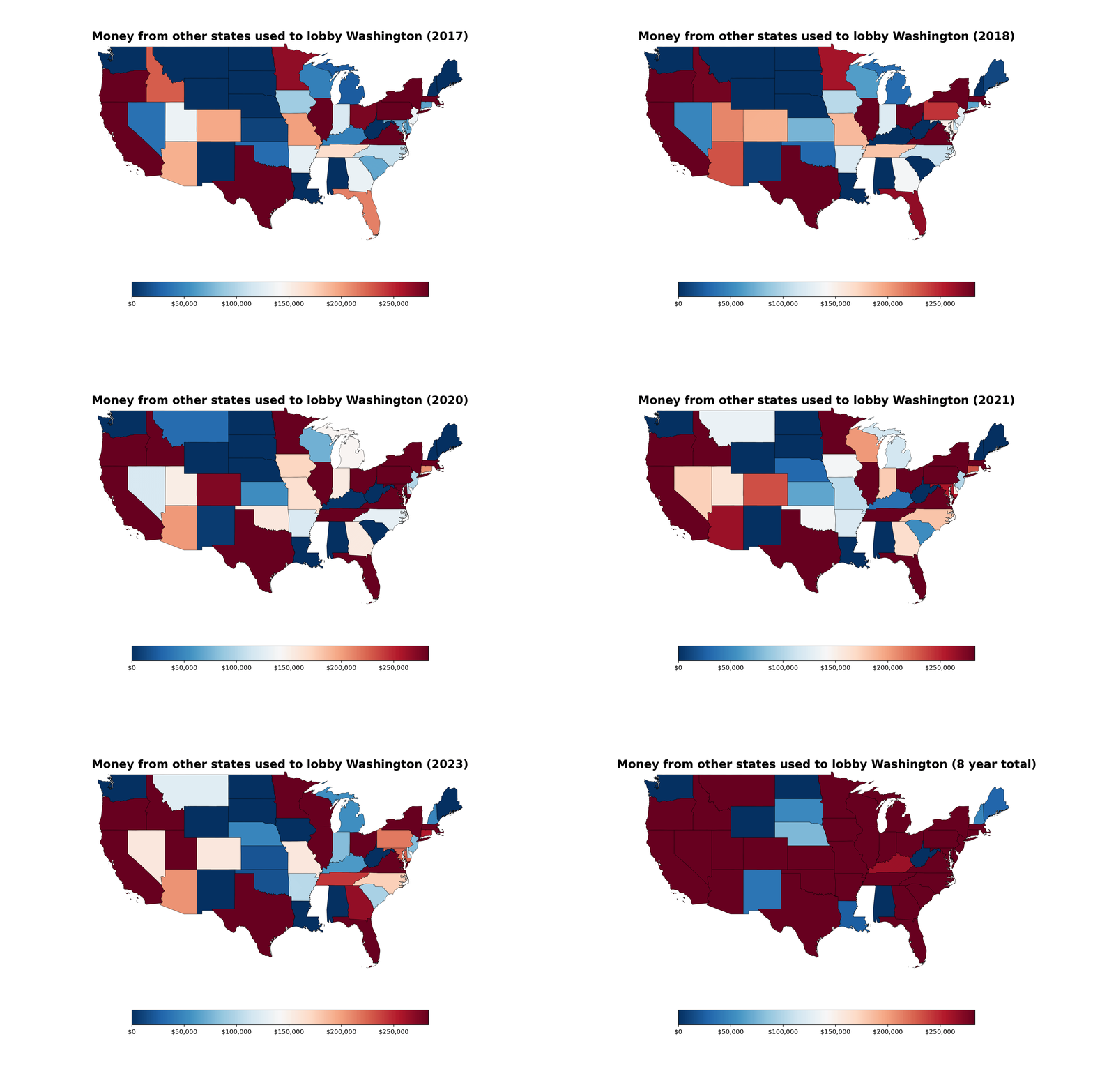
Geospatial Map of Lobby Funders

A Python project for mapping organizations and funding relationships geographically.

geospatialdata visualization

Charting lobby money in WA from outside state

From the 2016 through 2023


  • License: GPL-3.0-or-later

demo of geospatial_map.py

Repo contents:


❯ lsd --tree --sort extension
 .
├──  us_states                     # shape file
├──  recordings                    # required for build output
├──  tools
│   ├──  optimizer_for_states.py
│   └──  plot_color_gradients.py
├──  Dockerfile
├──  states_no_wa.csv
├──  README.md
├──  geospatial_map.py              # mapped numbers animation
├──  bar_chart.py                   # bar chart animation
├──  test_setup.py
├──  docker-entrypoint.sh
├──  container_enter.sh             # interactive shell
├──  container_run.sh               # run command for docker
├── 󰌠 requirements.txt
└──  LICENSE.txt                    # gpl ftw

Inspiration:

I was looking through data.wa.gov for a dataset to do a project with, and I saw that the PDC has information from lobbyist disclosures on who is funding their lobbying efforts. I thought that was really interesting, so I looked into it more, and one of the things that really struck me was from how much of the money is coming from outside of WA.

I plan to release more charts done with other information from this dataset. I have a blog site with a couple more charts at developer monkey / unixgreybeard.org.
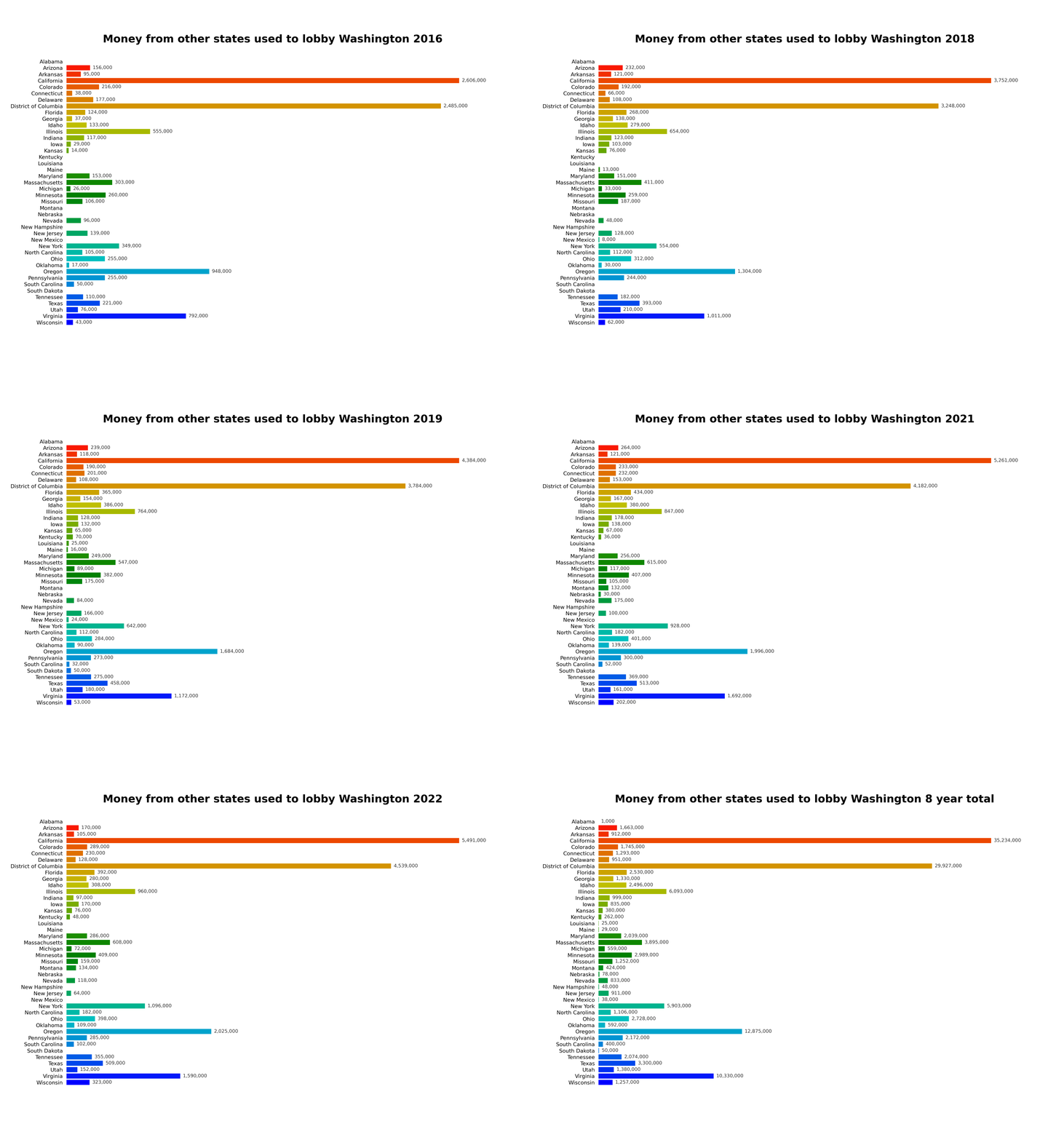
demo of bar_chart.py

TL;DR how do I run these chart generators?

The easiest thing to do is run the chart recorders in a docker image, so dependencies are isolated from your system and the recordings return in both .gif and .mp4 format in the $(pwd)/recordings folder.

OCI version is available at Docker Hub and requires a recordings folder for output.

A geospatial exploration of lobby funders. The project profile is loaded from MDX and can be expanded later with the repository README, screenshots, or implementation notes.

View repository on GitHub ↗

This profile includes a short excerpt from the repository README.

Shell★ 1 · Forks 0

archorg-dl

Download and re-create TV from the Internet Archive website.

shellinternet archive

archorg-dl

Download and reconstruct archive.org television broadcasts from segmented clips.

Linux License Dependencies

archorg-dl automates downloading and reconstructing segmented video clips from archive.org television recordings into a single playable video file.

Archive.org limits playback of many TV broadcasts to 1-minute segments, requiring manual scrolling through dozens of clips to watch a full program.

This tool downloads those clips and reassembles them into a single video file.


Table of Contents

  • Features
  • How It Works
  • Dependencies
  • Installation
  • Quick Start
  • Usage
  • Examples
  • Output Structure
  • Cleaning Temporary Files
  • Troubleshooting
  • Supported Systems
  • Repository
  • Disclaimer

Features

  • Download segmented video clips from archive.org TV pages
  • Automatically reconstruct clips into a single video
  • Organize downloads by broadcast network
  • Lightweight shell script
  • Uses standard Unix tools
  • Minimal dependencies

How It Works

  1. You provide an archive.org program page URL.
  2. The script extracts all segment video URLs.
  3. Each segment is downloaded.
  4. Segments are assembled into a single MP4 video using ffmpeg.

Dependencies

Required command-line tools:

bat
bc
ffmpeg
jq
yt-dlp
View repository on GitHub ↗

This profile includes a short excerpt from the repository README.

TypeScript★ 0 · Forks 0

Agent Visibility Template

A TypeScript template for making agent execution and progress visible.

agentsobservabilitytypescript

AI Agent Visibility

Deploy to Cloudflare

<!-- dash-content-start -->

Search is shifting from links to answers. To show up in those answers, your content has to be readable by AI agents and crawlers — in whatever convention each one looks for. This template makes your site visible across every agent-discovery surface from a single content store, powered by Workers AI.

How it works: the Worker enriches your content once with Workers AI — deriving a clean title, an agent-friendly summary, key points, and topic tags — caches it in KV, then projects that one store onto every surface an agent might request:

  • /llms.txt and /llms-full.txt — the llms.txt index conventions
  • /index.json — a typed JSON index for structured agents
  • /<slug>.md — clean per-page Markdown, ideal for grounding and citation
  • /robots.txt — explicit directives that welcome named AI crawlers
  • Content-Signal headers — declare how agents may use your content
  • JSON-LD (/jsonld, /<slug>.jsonld) — schema.org structured data for classic and AI crawlers
  • Web Bot Auth (optional) — verify the identity of signed agents (RFC 9421, Ed25519)

The same data, in whichever shape an agent prefers. A bundled UI lets you preview and copy each surface live.

This template ships with sample content so it works the moment you deploy it. Point it at your own pages by editing src/lib/content.ts, or POST content to /api/resources to enrich it on the fly.

<!-- dash-content-end -->

Who is this for

  • Anyone who wants to show up in AI answers. This gives agents a clean, structured copy of your content to cite.
  • Developers exploring AEO. A working reference for emerging agent-discovery conventions.
  • Teams who keep getting agent 4xxs. Serve agents content they can read.

Looking for a commerce-specific version? See the commerce-llms-txt-template.

A TypeScript starting point for agent-oriented interfaces where execution state, progress, and outcomes need to remain visible.

View repository on GitHub ↗

This profile includes a short excerpt from the repository README.

HTML★ 0 · Forks 0

ansipath

Print each PATH entry on a new line in a rainbow of readable terminal colors.

shellterminalansi

ansipath 🌈

Discover $PATH legibility: print each path on a new line in a rainbow of colors, so you can actually read it.

leg•i•bil•i-ty | leja'bilade | noun
the quality of being clear enough to read: we've increased the type size for
greater legibility; design and layout clearly affect the legibility of the text.
Syns: READABILITY, clarity, readableness, ease of reading

Features

  • Colorizes each $PATH entry by directory depth.
  • Flags duplicate entries and directories that no longer exist.
  • Includes which and pathmunge shell helpers for Bash and Zsh.

Installation

Install uv, then run these commands from the repository root:

The default build uses catppuccin_mocha. To choose another palette, copy it to palettes/palette.json before building.

cp -v palettes/catppuccin_mocha.json palettes/palette.json
./scripts/build.sh
bash install_helpers.sh

The helper installer supports Bash and Zsh. Restart your shell, or source the profile file reported by the installer.

Usage

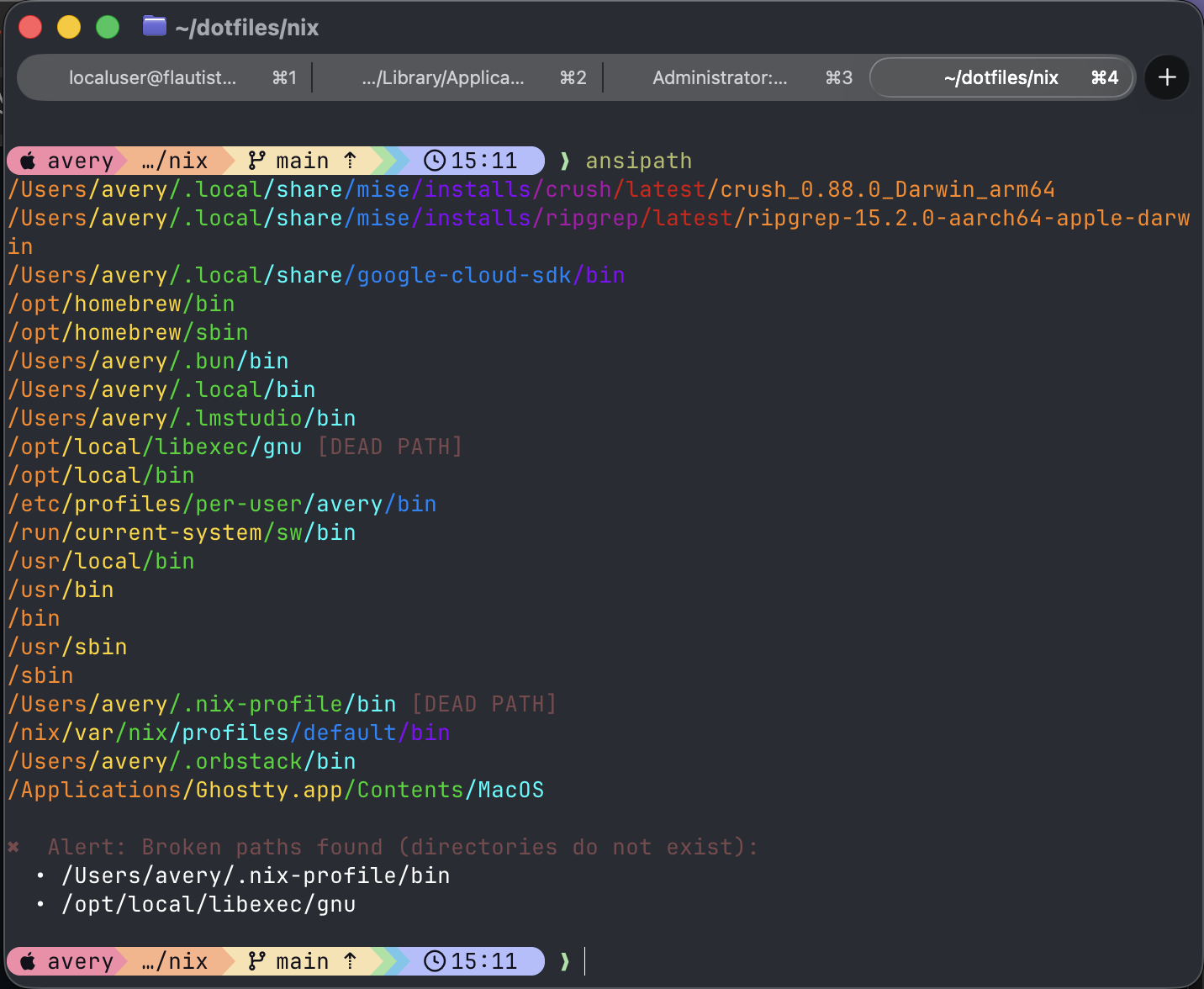
  1. ansipath command

    Print the current $PATH, one entry per line.

    ansipath
    

    ansipath output

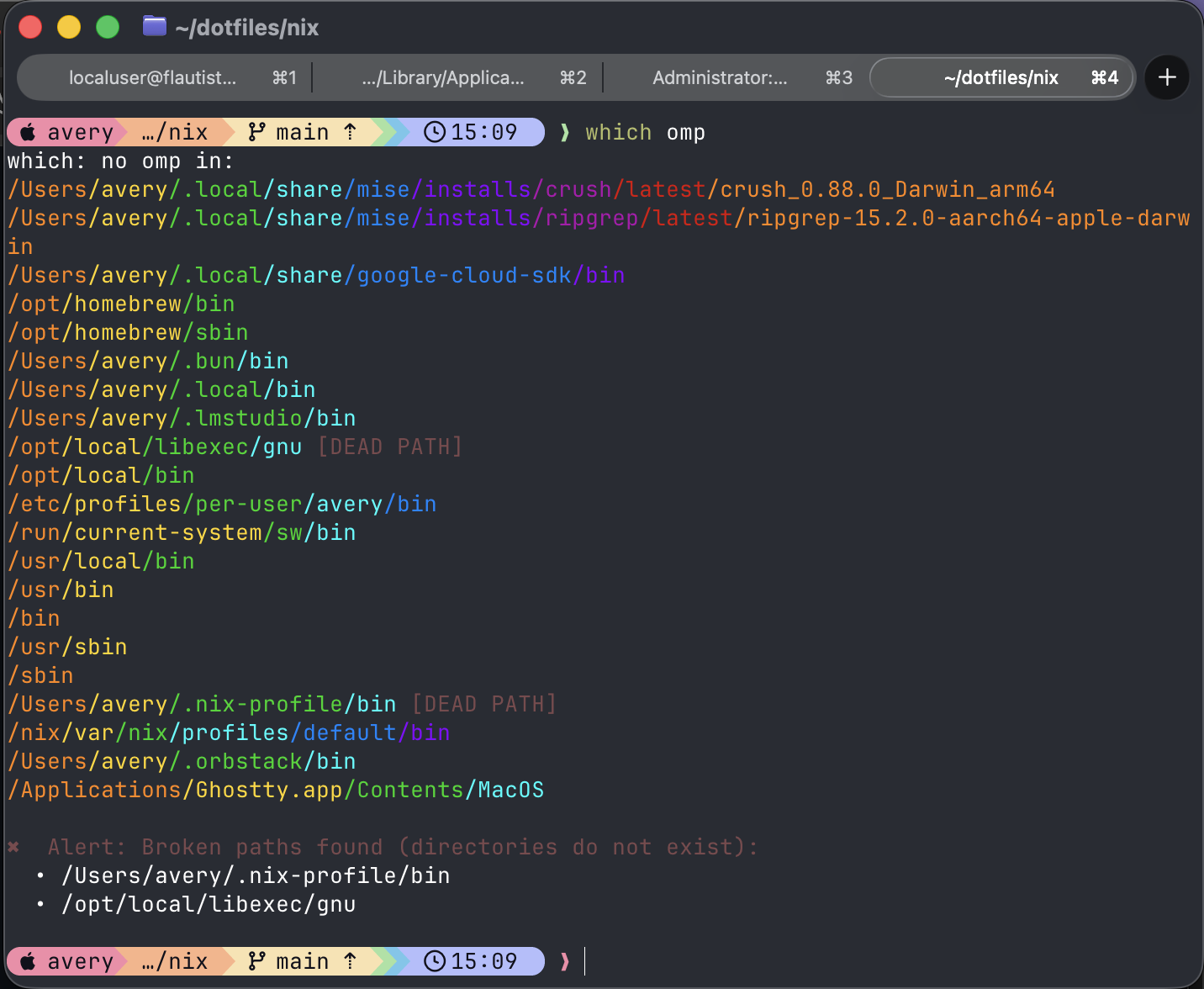
  2. which helper

    Run which as usual. If a command is missing, the installed helper prints the lookup error and runs ansipath automatically.

    which helper output

View repository on GitHub ↗

This profile includes a short excerpt from the repository README.
JavaScript★ 0 · Forks 0

Linda B. Notary

Business site for a local notary public.

css-in-jsformikreactyup

Linda B the Notary


see it @ https://lindabnotary.com

This is a business profile site I created for a client who is a (wait for it) notary

It's a simple obligatory "about me" type site, but I crammed in a decent number of features:

  • Responsive layout (Chakra UI + @emotion CSS-in-JS) - most pages / components have 5 different sizes
  • Lightly animated navigation (React Router v5 + Framer Motion)
  • Dark mode (user selected, but system detection can be easily implemented)
  • Email form using Formik
  • Yup validation (with fun, animated feedback)
  • FormData POST w/ fetch (PHP mail backend)
  • Service region map (Google maps)
  • Modal dialogs for all the (appropriate) things...

Primarily stateless functional design pattern. Emphasis on DRY / component reusability. Attempted to be as idiomatic as possible. Created with scaling and collaboration among multiple experience levels in mind.

Site is organized as follows:

  • pages: Intended to be primarily content-focused, almost all code is obscured
  • pageComponents: Largest sections of pages that require some syntactical granularity
  • pageElements: Smaller sections of pages that require some syntactical granularity
  • components: Single, reusable items

Recently added features:

  • Email form modal and backend
  • Discount offer modal (delayed 1 min)

Performance revisions:

  • Code-splitting
  • Memoization

On the horizon (in order of importance):

  • Site analytics (Google)
  • Unit tests
  • Snowpack version (developing in parallel - reason for relative paths)
  • Storybook for some components
View repository on GitHub ↗

This profile includes a short excerpt from the repository README.
Jump to a project

Back to project index
Avery Freeman

アブリーフリーマン

averyfreeman · he/him

Can't stop, won't stop.

6 followers·17 following
unixgreybeard.orgGitHubLinkedInX / Twitter
Articles234
Repositories36
unixgreybeard.org

Ideas, systems, and useful detours.

ArticlesProjectsGitHubLinkedInX

🄯 2026 Avery Freeman